dvproduction features
MES, visual scheduling and machine IoT — all inside Business Central.
Shop Floor Control — MES embedded in Business Central
Run every activity on the shop floor from BC: check-ins, consumption, incidents, quality measurements and screens tailored to each industrial process.
Operator check-ins
- Start and end of operations with time control
- Date, time, machine and operator logged automatically
- Automatic execution time calculation
- Configurable: allow one or multiple open operations at a time
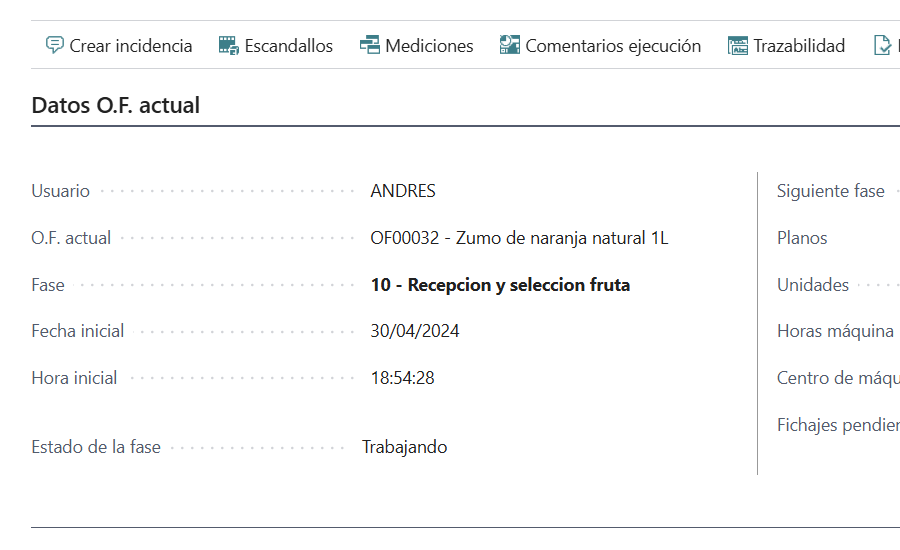
Material consumption
- Logging with lot and serial traceability
- Mandatory lot selection for tracked components
- Over-consumption control (warning or configurable block)
- Production journal lines generated automatically
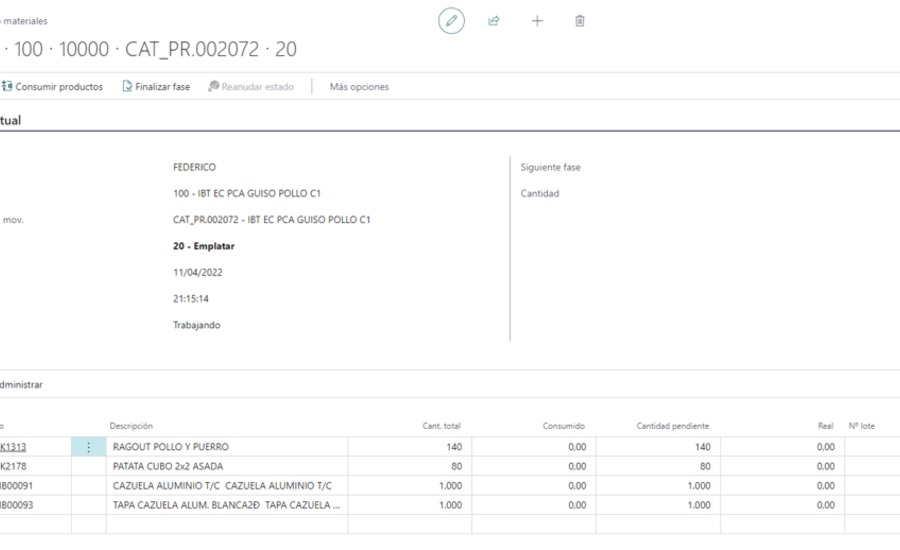
Incident management
- Configurable incident type catalogue
- Machine stop control by incident type
- Logging with start time, end time and affected units
- Full history in Incident Movements
- Automatic incidents from IoT alarms (if configured)
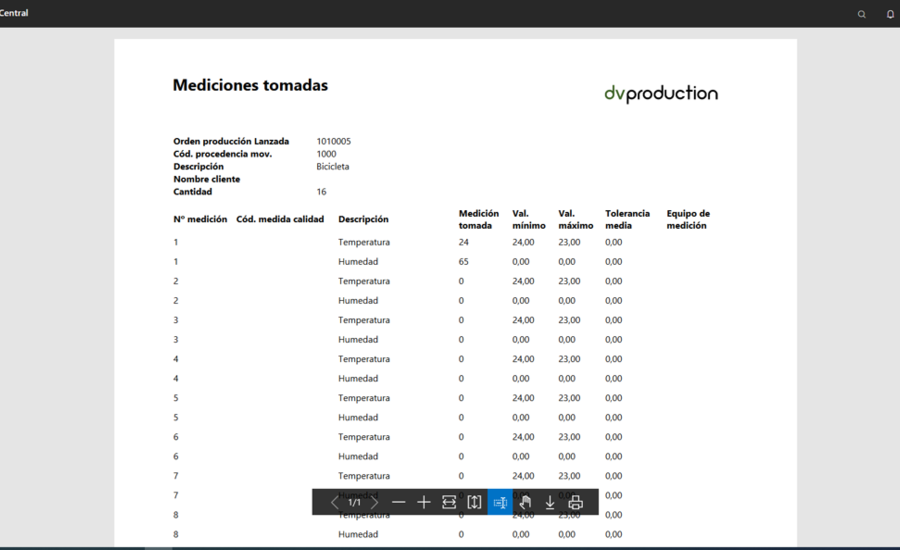
Quality measurements
- Measurement template per routing operation
- Logging with the measurement equipment used
- Equipment calibration traceability (device type, serial, range, frequency)
- RDLC report of measurements for audits
Specialised screens
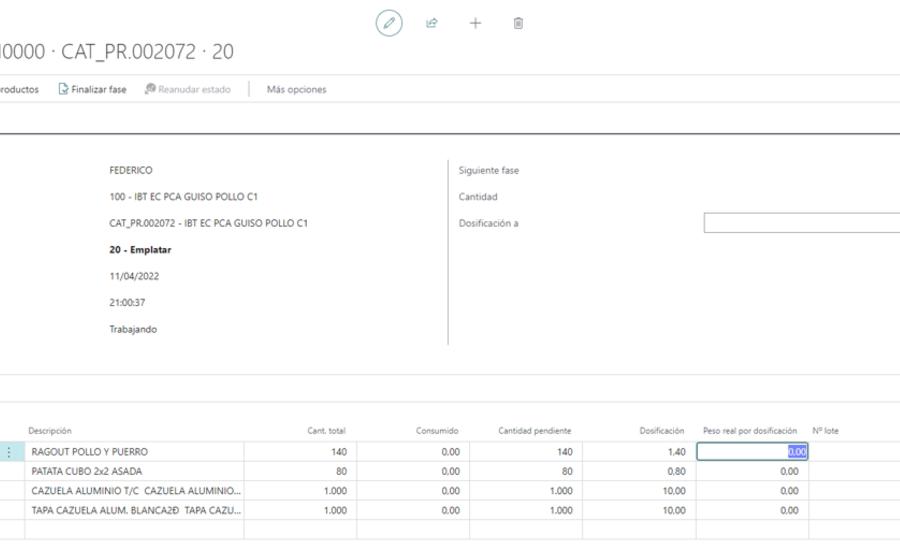
- Dosing: recipe, component amounts, actual weights, tolerances
- Packaging: product, lot, packed quantity, barcode labelling
- Consumption: component pick, quantity, lot, available stock
- Screen type is configured per operation in the routing
Personnel assignment
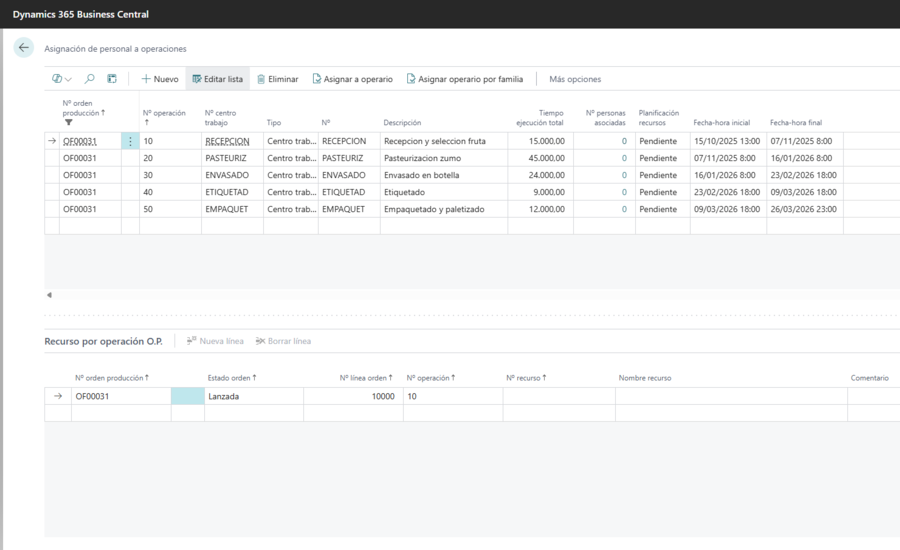
- Personnel by work centre / machine centre
- Resource families by skill/speciality
- Bulk automatic assignment by family
Visual Scheduling — four views in one screen
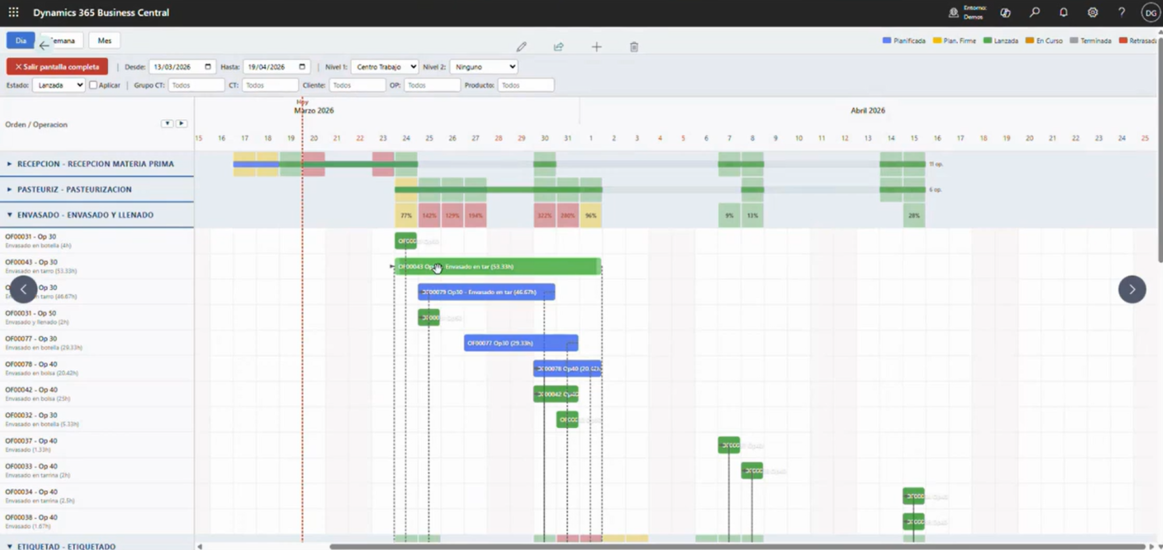
Gantt chart, workload matrix, operations list and operator calendar. With 10+ dynamic filters and a real-time KPI panel.
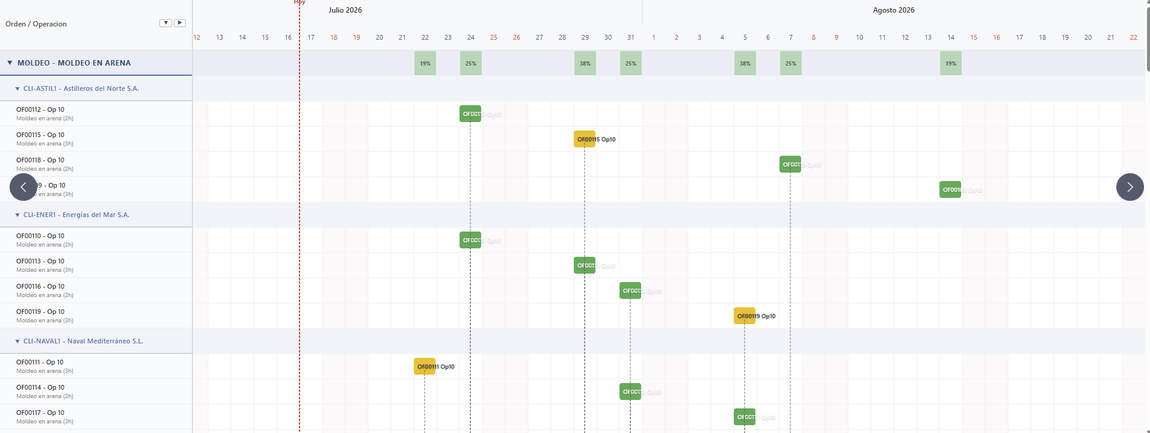
Interactive Gantt chart
- Time bars with drag-and-drop rescheduling
- Automatic work-centre capacity check (if >100%, offers first available day)
- Operation dependencies (predecessors/successors)
- Sales-order impact (delay detection with calculated days)
- Automatic adjustment of linked operations (later, earlier, or both)
- Single click: opens routing lines. Double click: opens order record
- Grouping by work centre, machine, resource, customer, order or category (2 levels)
- Periods: day, week or month
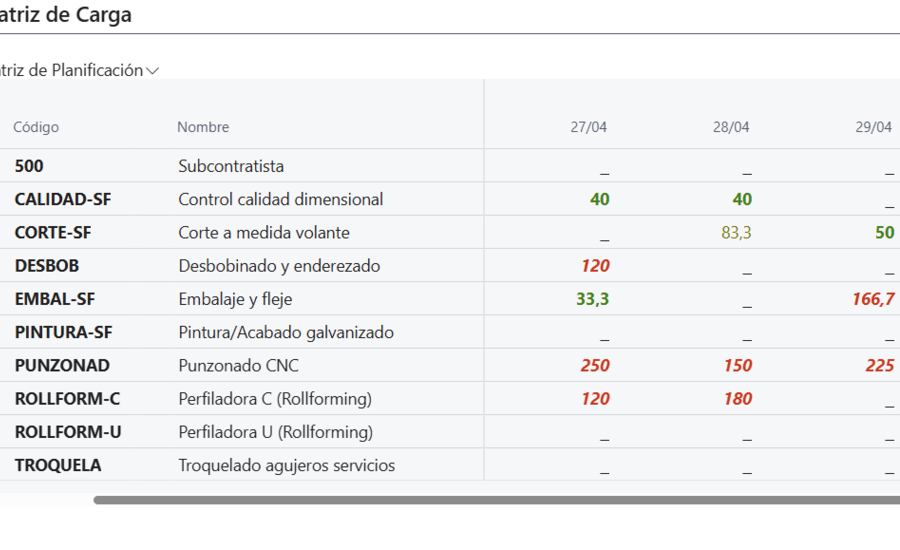
Workload matrix
- Rows: work centres, machines or resources (per grouping)
- Columns: up to 12 periods (day/week/month)
- Cells with % utilisation and colour code — Green (1-70%), Yellow (71-100%), Red (>100%)
- Drill-down on each cell to see which orders drive the load
- Period navigation (previous/next)
- Total load hours, capacity and overall % utilisation
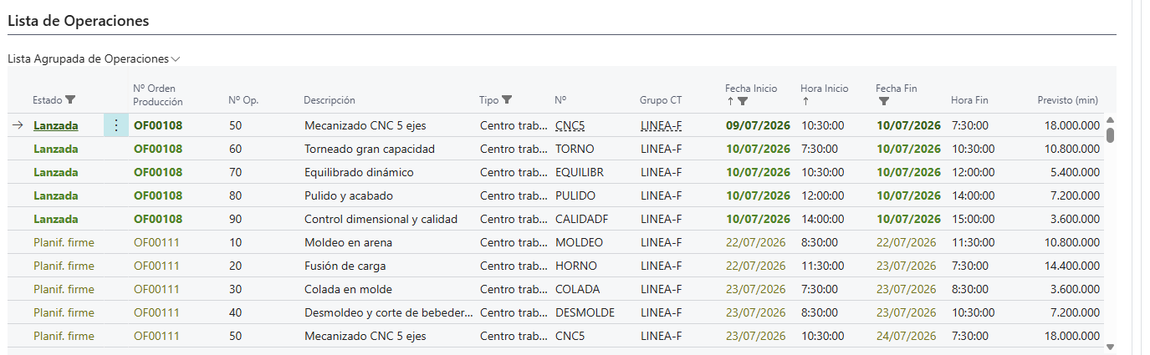
Grouped operations list
- All operations in tabular format
- Groupable by 2 levels (centre, machine, resource, customer, order, category)
- Quick review without the visual complexity of the Gantt
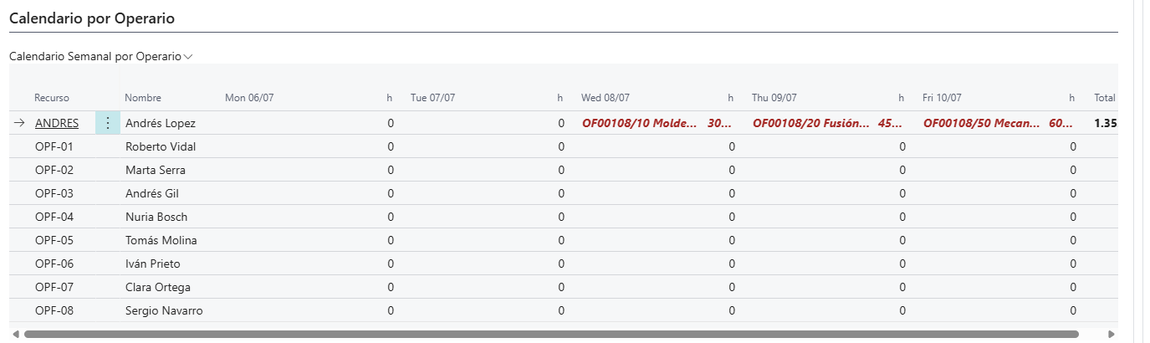
Operator calendar
- Weekly view (Monday to Sunday)
- Rows: operators/resources
- Cells: assigned operations with planned hours
- Detects under-loaded operators and over-assignments
Real-time KPI panel
- Delayed operations (red if >0, with drill-down)
- Operations in progress (yellow)
- Pending to release (yellow if >5)
- Planned hours this week and available capacity
- Plant utilisation % (green ≤80%, yellow ≤100%, red >100%)
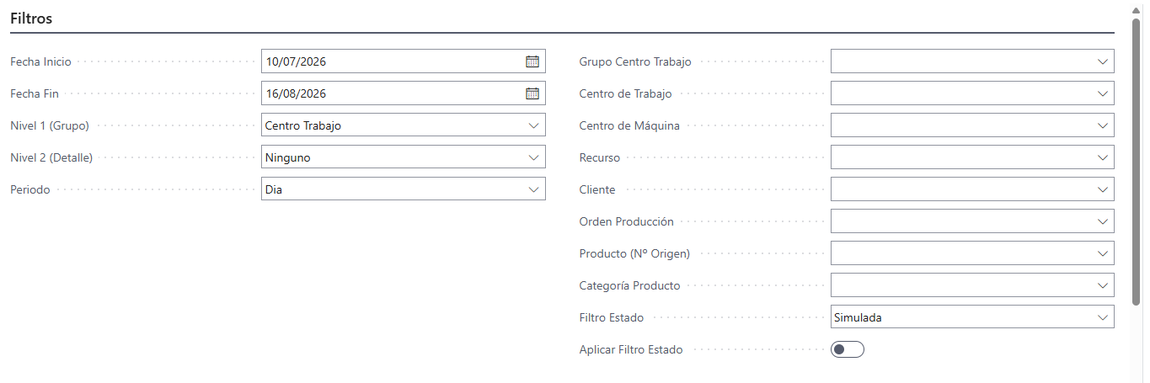
Dynamic filters
- Date range (configurable in Manufacturing Setup)
- Grouping level 1 and level 2, period (day/week/month)
- Work centre, machine centre, resource
- Customer, production order, product, category
- Order status (Planned, Firm Planned, Released, Finished)
- All applied instantly
Workload Levelling — the system proposes, you decide
Automatic overload analysis with replanning suggestions. Accept, reject or tweak each proposal individually.
Suggestion engine
- Scans every work centre in the date range
- Detects overloads (>100% utilisation)
- Looks for days with available capacity
- Builds suggestions with current dates, proposed dates, reason and impact on orders
- Individual accept or reject per suggestion
- Preview of linked operations before applying
- Adjustment of later, earlier or both operations
- Regenerates suggestions after changes
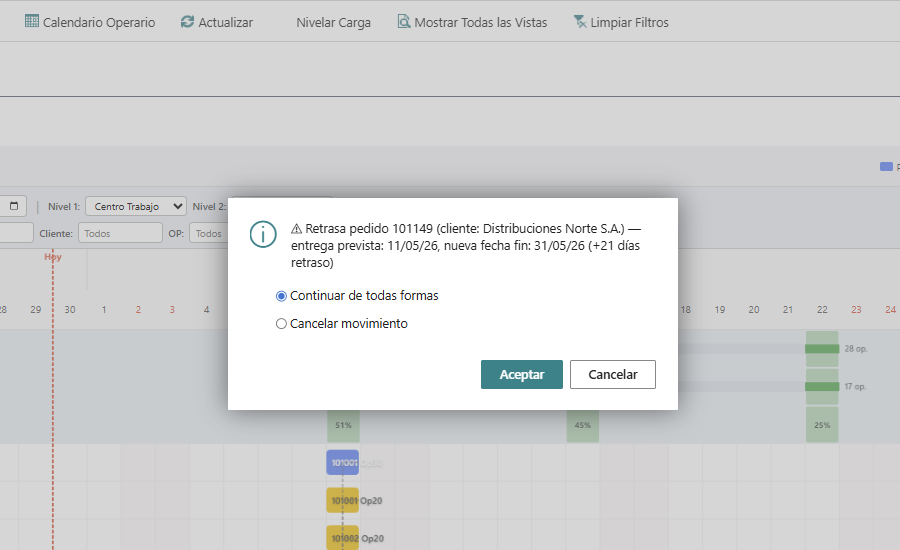
Delay alerts
- Automatic detection when a change delays a sales order
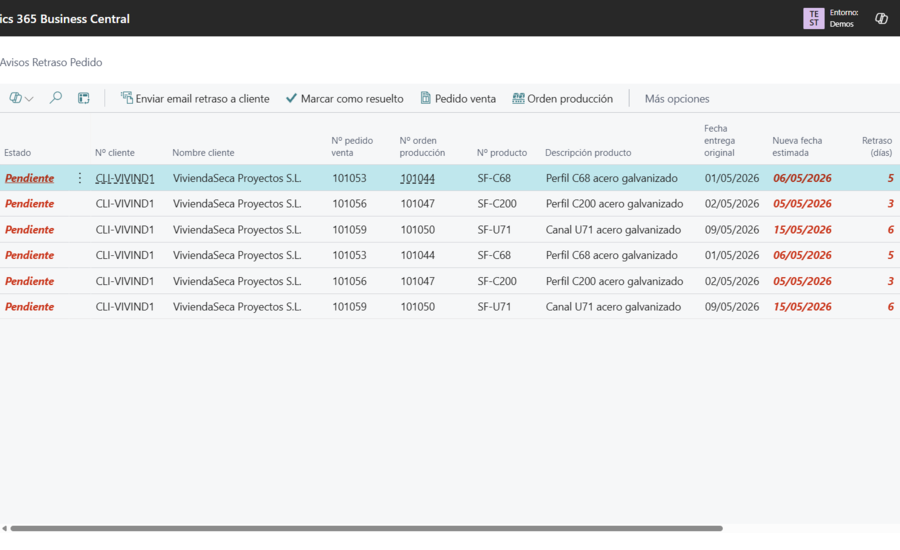
- Alert with customer, order, production order, original date, new date and days of delay
- BC notification to the salesperson (configurable)
- Automatic email to the customer with a configurable template
- Delay alert panel with statuses (Pending / Notified / Sent / Resolved)
Machine IoT — your machines talk, the ERP listens
Connect your machines to Business Central through a native REST API. 7 industrial protocols, automatic actions, real-time dashboard.
- 01 Machine
- 02 Industrial gateway
- 03 REST API (BC)
- 04 dvproduction
- 05 Dashboard
- OPC UA
- Modbus TCP
- MQTT
- S7
- REST API
- MTConnect
- EthernetIP
| Signal | Automatic action |
|---|---|
| Run | Creates operation start check-in |
| Stop | Closes check-in, computes execution time |
| PieceCount | Updates produced quantity |
| Alarm | Creates incident (if auto-logging is on) |
| Energy | Logs energy consumption |
| CycleTime | Logs cycle time |
| Speed | Logs speed |
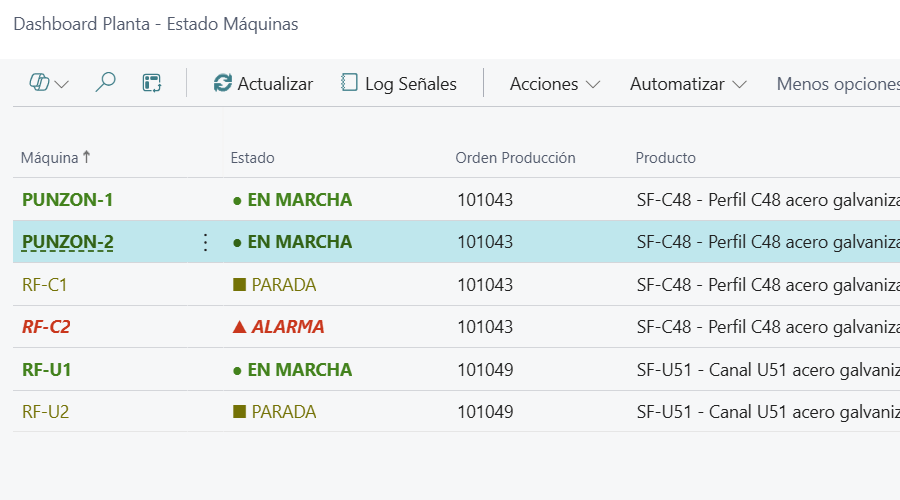
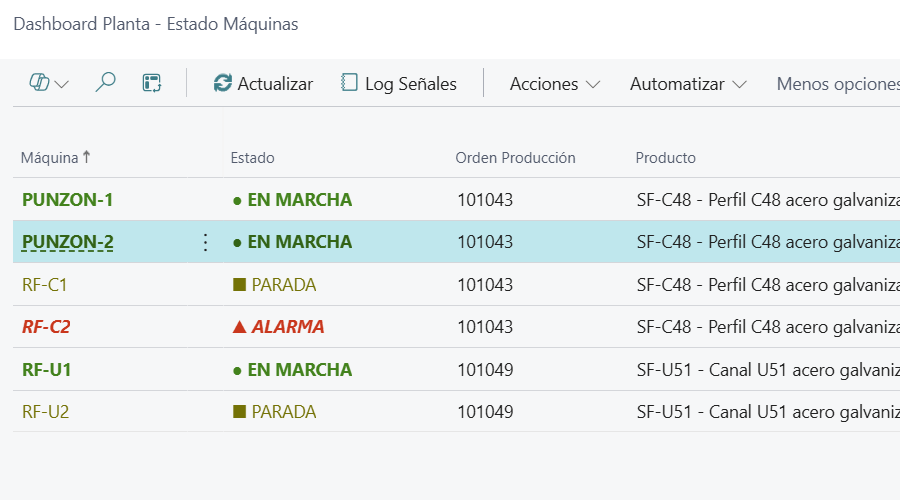
Shop floor dashboard
- Per-machine status with traffic light (green / yellow / red)
- Current production order
- Product being manufactured
- Assigned operator
- Order quantity vs. progress
- Pieces produced today
- Automatic refresh
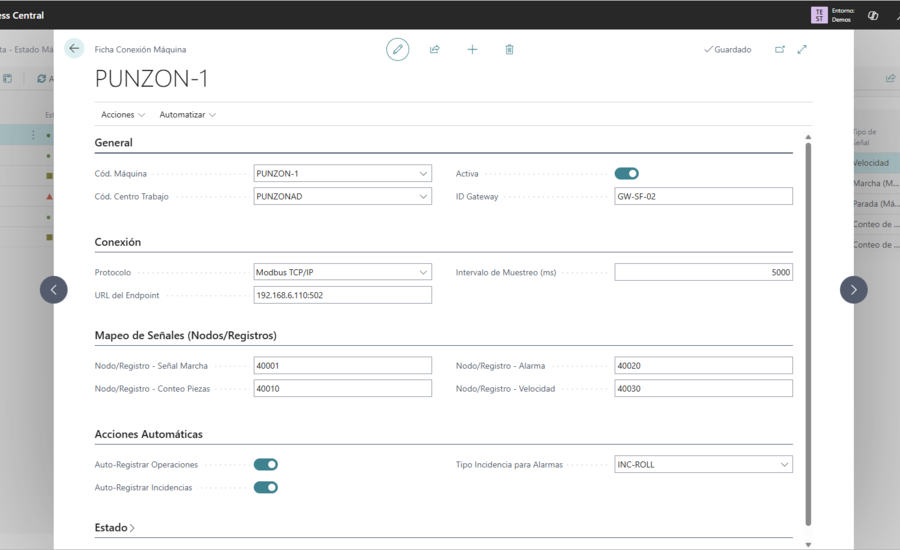
Per-machine configuration
- Machine code, protocol, endpoint URL
- Node IDs (Run, PieceCount, Alarm, Speed)
- Polling interval in milliseconds
- Gateway ID, linked work centre
- Flags: auto-logging of operations and incidents
Commercial Management for manufacturing
Quote breakdowns, commercial statuses, quote → order → production-order conversion, order tracking.
- Sales-quote breakdown by components (product, work centre, account)
- Configurable margin percentage per customer
- Commercial statuses: New → Under Review → Sent → Accepted / Rejected
- Automatic conversion quote → order → production order
- Automatic archiving of accepted quotes
- Order status with visibility of linked production orders
- 12 customised RDLC layouts (invoices, delivery notes, orders, route sheets, labels)
Want to see dvproduction in action?
Recorded demo, webinar and functional detail of dvproduction. No commitment.
Microsoft Solutions Partner for ERP