Skip to content
+34 647 373 996

Industrial manufacturing ERP for Business Central

Shop floor control, times and planning in a single system.

Your industrial factory runs on orders, times, downtime, workloads and machines that cannot work in isolation. With dvproduction, Business Central becomes a complete industrial ERP: a connected shop floor, real times, incidents, visual planning and the real cost of manufacturing.

Built for operations directors, plant managers and CEOs of industrial companies who need to anticipate bottlenecks, not discover them once they have already cost a delivery.

  • Microsoft Solutions Partner
  • Cosell certified
  • Guaranteed roadmap
  • Native on Business Central

Fill in the form to watch the video ↓

dvproduction demo video

Fill in the form to watch the video

Industrial manufacturing: metal, machining, assembly, plastic and PET

dvproduction is built for industrial companies that need to connect the office and the shop floor inside Business Central: production orders, routings, work centres, operators, machines, consumption, quality, warehouse, subcontracting and actual costs.

  • Metalworking and machining

    Parts, sub-assemblies, cutting, bending, welding, machining, assembly, painting and outsourced treatment operations.

  • Machinery and capital goods

    Manufacturing of assemblies, machines, structures, components and industrial products with routings, operations and costs per order.

  • Plastic and PET

    Industrial processes with machines, shifts, consumption, scrap, quality, traceability and shop floor control.

  • Manufacturing with subcontracting

    Internal and external operations connected: what leaves, when it comes back, what it costs and how it affects the schedule.

  • Make-to-order or make-to-stock production

    Demand-driven planning, sales orders, forecasts, safety stock and real shop floor capacity.

If your factory runs on production orders, routings, machines, work centres, operators, materials and dates committed to customers, this page is for you.

The challenges of industrial manufacturing — and how we help

Where control gets difficult in an industrial factory — and what changes with dvproduction.

  • Scheduling and machine workload

    An order changes, a machine saturates, an operation slips — and the impact reaches the office, purchasing or sales too late.

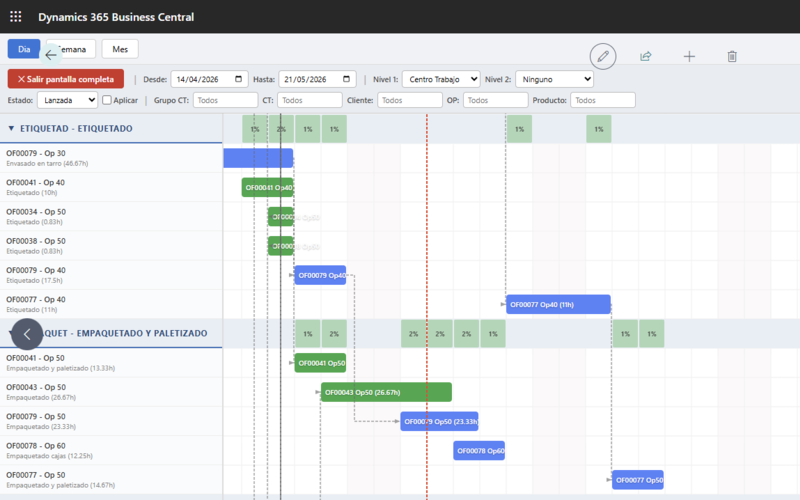
    With dvproduction: The Gantt and the workload matrix show the effect of the change on real capacity before you commit to a date.

  • Incomplete or late production reports

    If times, consumption, incidents and stoppages are logged at the end of the shift or the next day, the ERP is always one step behind.

    With dvproduction: Operators and machines report as it happens from the shop floor screen, so the data lands in Business Central while the work is still running.

  • Actual cost versus planned cost

    Margin cannot be explained by the bill of materials alone. You have to compare materials, times, machine, labour, subcontracting, rejects and rework.

    With dvproduction: Every order accumulates its actual cost by concept and is compared against standard and planned — with no manual reconciliation.

  • Subcontracting and external operations

    Cutting, painting, treatment, external machining, assembly or ancillary processes can break dates, traceability and costs when they sit outside the production flow.

    With dvproduction: The external operation is scheduled like any other: shipment to the supplier, return, cost and impact on the order date.

  • Warehouse, materials and shop floor disconnected

    An order is not built in production alone: it needs available materials, correct bins, logged consumption and coordinated movements.

    With dvproduction: Consumption draws down stock as it is logged, and dvlogistic adds radio-frequency scanning and bin management on top.

  • Quality, rejects and deviations

    A measurement out of tolerance, a non-conformity or a scrap event can hit actual cost, delivery and traceability.

    With dvproduction: Measurements, non-conformities and rejects are logged against the order and the operation, and flow through to their cost and traceability.

Three modules, one extension

What can you do with it?

You control what gets made, when it gets made, who makes it, with which materials, on which machine and what it really costs.

Buy them separately or as a pack. The same extension runs on Cloud and On-Premise.

Real-time shop floor dashboard

Machine IoT Connectivity

Seven industrial protocols

  • OPC UA, Modbus TCP, MQTT, S7, REST API, MTConnect, EthernetIP
  • Signals: Run, Stop, PieceCount, Alarm, Energy, CycleTime, Speed
  • Automatic check-ins from machine signals
  • Automatic incidents from alarms
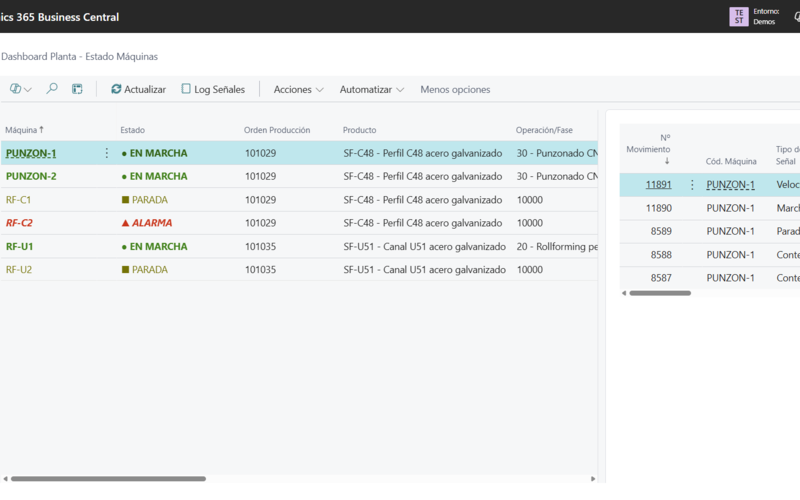
  • Real-time shop floor dashboard (traffic light)
  • Native Business Central REST API
How it works

Your full production cycle, step by step.

From scheduling the order to analysing actual cost. All inside Business Central, without jumping to other tools, without rekeying the data.

  1. 01

    Plan

    Lay out your production orders on the visual Gantt. Drag operations between work centres and the system validates capacity, dependencies and material availability. Automatic workload levelling suggests adjustments before bottlenecks appear. What you plan with visibility, you execute without surprises.

  2. 02

    Execute

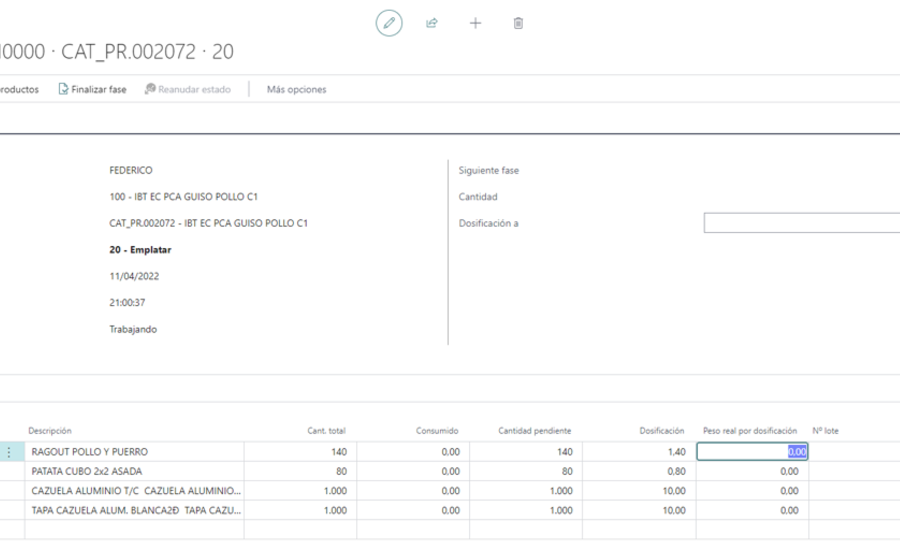
    Operators check in from their shop floor screen and declare progress on every operation in the routing. They log consumption with lot and serial traceability, raise incidents with a photo and a comment, and record quality measurements with their calibrated equipment. Shop floor screens are configured around what each operator profile actually does. Zero keyboards outside the shop floor.

  3. 03

    Connect

    Machines push signals to the ERP through 7 industrial protocols (OPC UA, Modbus TCP, MQTT, S7, REST, MTConnect, EthernetIP). Check-ins are generated automatically from Run/Stop signals. Piece counts and cycle times update on their own. Alarms turn into incidents with no human intervention. Your factory stops depending on a pen.

  4. 04

    Control

    Live KPIs: actual versus planned output, OEE by machine, efficiency by shift, actual versus standard costs. Traffic-light shop floor dashboard. Automatic delay detection with alerts to sales and to the customer. The conversation with your CFO stops being "I think we're on track" and becomes "this is exactly where we are, right now".

Industrial manufacturing on Microsoft

The most complete industrial manufacturing ERP on Microsoft Business Central.

dvproduction is a Microsoft-certified extension for Dynamics 365 Business Central. If you already run Business Central, it extends your ERP with the industrial capabilities the standard product does not cover. If you are considering replacing a legacy ERP, in-house developments or several disconnected systems, Business Central + dvproduction is implemented as one complete solution: production, warehouse, purchasing, sales, costing and finance in a single environment — no middleware, no external databases, no additional servers.

  • Microsoft Solutions Partner · Cosell
  • Published on Microsoft AppSource
  • Microsoft-certified extension
  • 23 years in the sector
5 capabilities that set dvproduction apart from standard Business Central
Capability Standard BC BC + dvproduction
MES shop floor control embedded in BC
Screens configurable per work centre
Workload matrix with % utilisation and automatic levelling
Subcontracting and external operations inside the production flow
7 industrial IoT protocols (OPC UA, Modbus, MQTT, S7, REST, MTConnect, EthernetIP)

The full comparison covers 3 areas integrated into a single extension: Shop Floor Control (MES), Visual Scheduling and Machine IoT Connectivity.

Full comparison

Get the full comparison: standard BC vs BC + dvproduction

The table above is a preview. The full document breaks down every capability across the three areas — shop floor control (MES), visual scheduling and machine IoT connectivity — so you can compare it with what you already have.

  • What standard Business Central covers and what it does not
  • A breakdown of the three dvproduction areas
  • Useful for comparing against your current ERP or other MES

More than shop floor control: an industrial ecosystem on Business Central

dvproduction covers manufacturing, and depending on what your plant needs it can be complemented with the rest of the Davisa ecosystem —warehouse, quality, finance, productivity and equipment control— within the same Business Central.

  • Un único ERP Business Central para toda la fábrica: órdenes, tiempos, paros, incidencias, consumos, cargas y costes en el mismo sistema.
  • Extensiones industriales certificadas: dvproduction para control de planta, planificación MES e integración con maquinaria.
  • Maquinaria conectada a gestión: las señales de marcha, paro, alarma y contaje entran solas desde los PLCs.
  • Planificación visual y cargas reales: la secuencia de cada máquina sobre su carga real, con nivelación asistida.
  • Extensiones certificadas con denominación Cosell para gestión financiera, RRHH y control horario, mermas, calidad, GMAO y gestión del plástico.
  • Ecosistema Microsoft completo: Power BI, Power Apps, IoT y automatización con la seguridad de la plataforma Microsoft.
What customers of this product say

Real voices from the industry.

Las fábricas industriales que trabajan con metal, mecanizado, montaje, plástico y PET coinciden en lo mismo: necesitan datos reales de planta, menos paros sin registrar y una planificación que responda a lo que está pasando en las máquinas.

We track the progress of our production in real time, which lets us get ahead of anything unexpected.

Abel GascónGeneral ManagerIndustrias Freconsa SL

Having all the data and information integrated in a single tool like dvproduction has allowed us to optimise both our production and management processes.

Frank PayerasDirectorValdepinto

Implementing the ERP with Davisa has far exceeded our expectations.

José Antonio LorenteTechnical DirectorGesan

What dvproduction is for industrial manufacturing

dvproduction is an extension/MES for Microsoft Dynamics 365 Business Central aimed at industrial manufacturers that need to connect shop floor and office in real time. It manages production orders, routings, operations, work centres, machines, operators, consumption, quality, subcontracting, visual scheduling and actual costs inside the same environment where the company runs purchasing, sales, inventory, finance and accounting.

It adds shop floor control (MES), visual scheduling with Gantt and workload matrix, shop-floor data capture, machine IoT connectivity and actual cost per production order — no middleware, no external databases. Alongside Business Central, it completes the ERP suite with financial and analytical control.

Frequently asked questions

  • What kind of industrial companies is dvproduction a fit for?

    For manufacturers in machining, metalworking, boilermaking, capital goods, assembly, machinery, plastic/PET and cardboard, with routings and make-to-order, make-to-stock or mixed production.

    Each type of manufacturing has its own page:

  • Does dvproduction replace Business Central?

    No. dvproduction extends Business Central with shop floor control, MES, visual scheduling, shop floor capture, IoT and industrial costing. If you already run Business Central, it is added on top of what you have; if you are considering changing ERP, Business Central + dvproduction is implemented as a complete industrial management solution.

See all frequently asked questions →
Your 30-minute call

Tell us what's on your mind

If you have already watched the demo or the webinar and want to work out whether dvproduction fits the way you manufacture, we can go through your questions in a short call.

Fill in the form and a senior consultant from the sector will get in touch: 30 minutes, free, and focused only on your concerns or questions about scheduling, shop floor control, costs, Business Central, IoT, warehouse or implementation.

Sales phone: +34 647 37 39 96 Email: ventas@davisa.es
Watch demo Message us on WhatsApp