Clock-in · Time Tracking · Project Allocation · Costs · Leave & Absences

The time tracking you can prove, not just keep

dvgtime logs every working hour in a complete, traceable and tamper-proof record —who clocked in, where, when and who changed it— retains it for the legally required period and makes it instantly available for any labour inspection.

or view the demo without signing up → No sign-up, no data. See the real product with sample data.
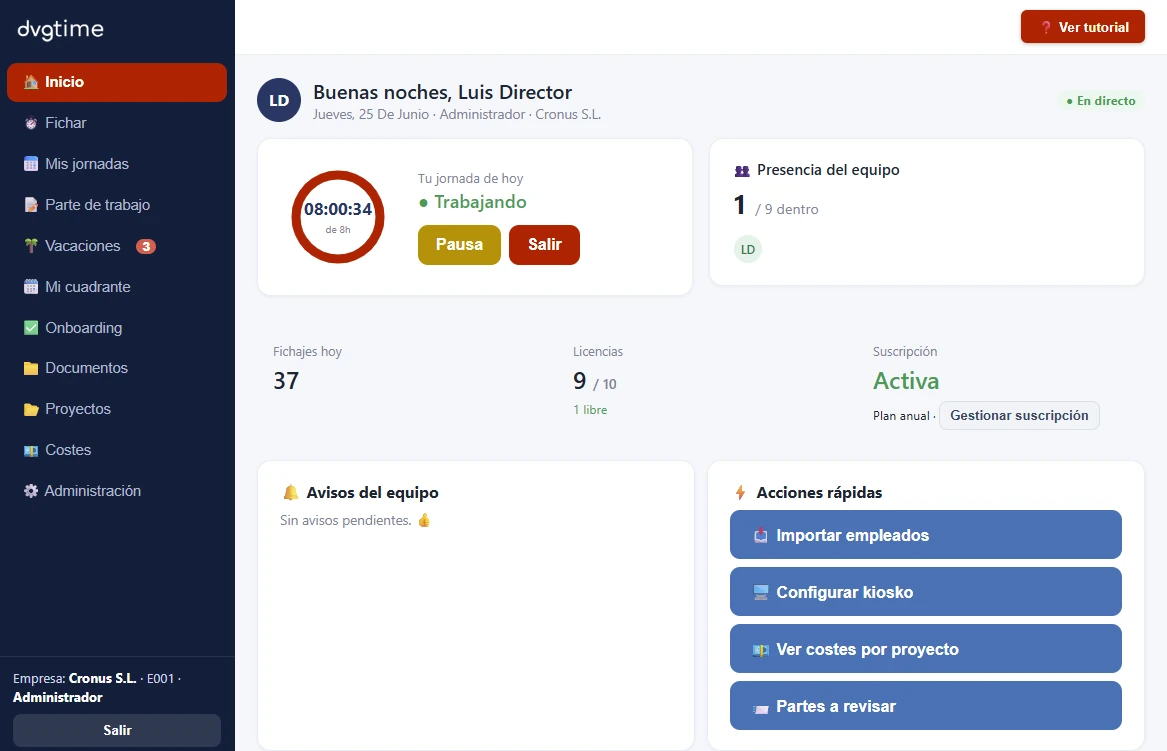
dvgtime home dashboard: live clock-in ring, team presence, licences, alerts and quick actions

Complete workforce control in a single platform

  • Clock-in
  • Project allocation
  • Leave & absences
  • Work reports & costs
  • Geolocation

Standalone app · Works with any ERP · Native integration with Business Central

Features

Much more than clocking in: a complete workforce management platform

Clock-in, absences, teams, onboarding, work reports, projects and costs in a single platform. Native Business Central integration available for the Cloud version.

Clock in from wherever work happens

Your teams clock in at the office, on site, on the road or working remotely, with individual employee identification: mobile app, shared kiosk on tablet and web, with optional geolocation.

  • Mobile app (PWA)
  • Kiosk with QR and PIN
  • Responsive web
  • Geolocation

Complete and auditable records

Every clock-in is timestamped, tied to a specific user and fully traceable —recording who changed it and when— with legal retention and instant export for inspections.

  • Change traceability
  • Unambiguous identification
  • 4-year retention
  • Exportable for inspections

Absences, leave and shift planner

Holiday requests, sick leave and permits with annual balance and two-level approval (manager and director), plus a weekly shift planner view.

  • Holiday balances
  • 2-level approval
  • Sick leave & permits
  • Weekly shift planner

Teams, roles and onboarding

Manage users, teams and role-based permissions, onboard employees via Excel/CSV import, and track onboarding progress with configurable templates and a progress bar.

  • Roles & permissions
  • Excel/CSV import
  • Configurable onboarding
  • Document manager

Work reports, projects and costs

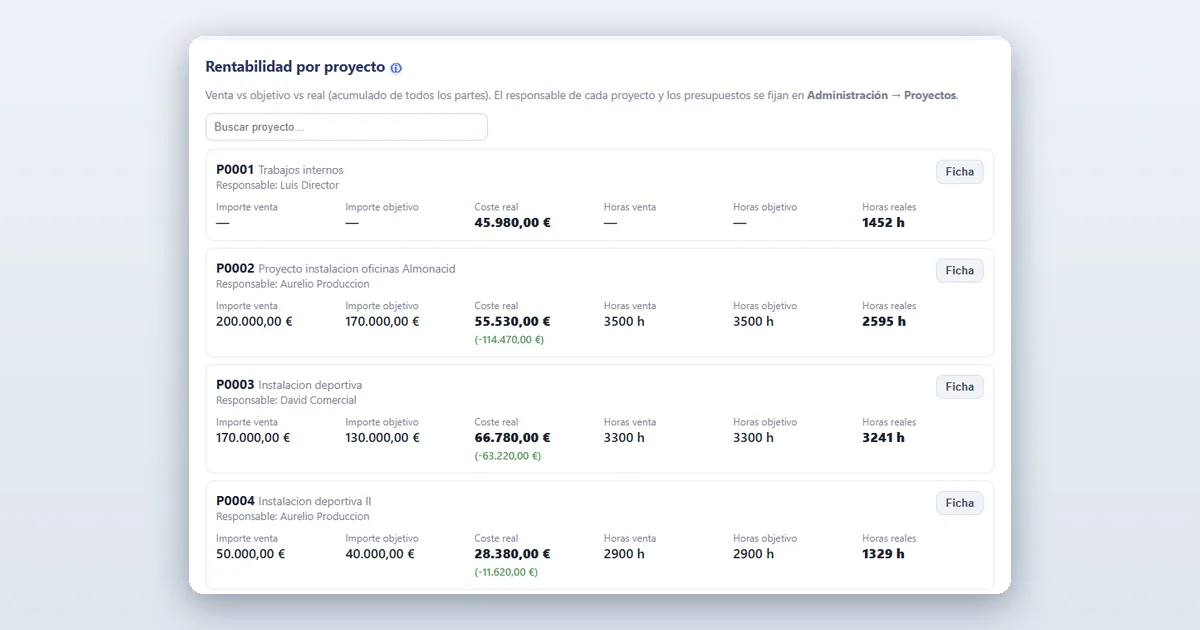
Work reports by concept and unit (hours, m³, labour, machinery), project allocation and profitability and cost analysis per employee. Plus notes and alerts.

  • Reports by concept
  • Project allocation
  • Project profitability
  • Cost per employee

Business Central integration (optional)

Using Business Central? Connect it natively and push clock-ins, absences and project costs to the ERP. Your employees clock in without a BC licence. Completely optional.

  • Native connector
  • Costs in the ERP
  • Clock-in without BC licence
  • Role & alerts in BC

Compliance protection for your company

Everything you need to face an inspection with peace of mind. The platform alerts the manager when a clock-in comes from a new location or when an employee exceeds their calendar hours, keeps a record of who approved each case —and when— and requires prior authorisation for overtime: if it is not authorised, it does not count as worked time.

  • Alert when validating new locations
  • Validation by company, team or employee
  • Record of who approves, with date and time
  • Excess-hours alert to the manager
  • The employee acknowledges the alert (traced)
  • Overtime authorised by date or period
  • Overtime request and approval
  • Automatic updates (regulatory)

Is it right for you?

  • Prove compliance during a labour inspection
  • Reduce the risk of fines for non-compliant time tracking
  • Ditch spreadsheets and disconnected clock-in apps
  • Control overtime, travel time and remote work
  • Allocate hours and costs to each project
  • Manage holidays and absences with balance tracking
  • Your employees clock in without a Business Central licence
  • A single vendor for implementation and support
See the price

Why trust dvgtime

Most apps just store clock-in records. The problem comes when you have to prove those records are complete and have not been tampered with.

dvgtime gives you records that stand up to a labour inspection —with timestamps, user identification and full change traceability— plus a complete workforce management platform: leave, teams, projects and costs in one place.

And you don't need an ERP or anything to install: dvgtime is ready to use from day one. If you work with Business Central Cloud, the integration is available as an optional add-on.

  • Records you can prove
  • It's an app: no ERP needed (connect it if you want)
  • Clock in from anywhere
  • Holidays, projects and costs, all in one
  • No rollout: download and go
  • Optional support straight from the maker
  • Automatic regulatory and product updates
  • Alerts and company protection
Plans

Track hours, absences and costs from an inspection-ready platform

Start with the annual plan that best fits your company.

What's included exactly? View features →

Native BC

Conector Business Central

Microsoft Solutions Partner — extensión certificada

2.400 € / company / year (annual prepayment)

  • Sincronización nativa con Business Central
  • Costes por proyecto en el ERP
  • Tus empleados fichan sin licencia de BC
  • Implantación incluida
Get the Business Central connector Secure payment with Stripe · One-time payment
Integrated

Conector a otros ERP

Price on request

  • Integración con Sage, SAP, TRIP y otros ERP
  • Fichajes y costes por proyecto en tu sistema
  • Tus empleados fichan sin licencia del ERP
  • Implantación incluida
Request a quote

Te preparamos un presupuesto a medida. Escríbenos o llámanos:

ventas@davisa.es +34 647 373 996

App · web format.

Native BC. Natively integrated with Business Central.

Integrated. Connected to other ERPs via a connector that synchronises data between dvgtime and your company's management platform.

What is dvgtime?

dvgtime is a Spanish SaaS platform for workforce management and time tracking: clock-in (web, mobile and kiosk), absences, geolocation and leave, teams and roles, onboarding, document management, work reports, projects and costs. It replaces spreadsheets and disconnected apps with a single platform, providing complete and auditable records for any labour inspection.

Frequently asked questions

What you most often ask us about dvgtime

  • Does it comply with current labour regulations?

    Yes. dvgtime complies with Spain's Real Decreto-ley 8/2019 and art. 34.9 of the Workers' Statute: it logs each person's working hours, retains the history for the legally required period (4 years) and keeps it available and auditable for a labour inspection.

  • Can I prove that a record has not been tampered with?

    Yes. Every clock-in is timestamped and linked to a specific user, and every change records who made it and when. Showing an inspector an app is not enough: you must be able to certify who clocked in, whether a record was modified, and that the information is available instantly. That is exactly what dvgtime is designed for.

  • Is Business Central required?

    No. dvgtime works on its own via browser, mobile app and kiosk, with no need for Business Central. If you use it, we offer an optional native connector that pushes clock-ins, absences and project costs to the ERP — and your employees clock in without a Business Central licence.

View all frequently asked questions →

Deja de solo fichar. Empieza a poder demostrarlo.

Tu registro y control laboral por tan solo 5 €/empleado al mes, prepago anual.

Empezar ahora →
Message us on WhatsApp